Googling, a comic, and success indicator – Top 3 of the Week
https://eduk8.me/2019/10/google-like-a-hacker/
https://eduk8.me/2019/09/comic-current-status/
https://eduk8.me/2019/10/moving-past-the-marshmallow-test-to-predict-future-success/
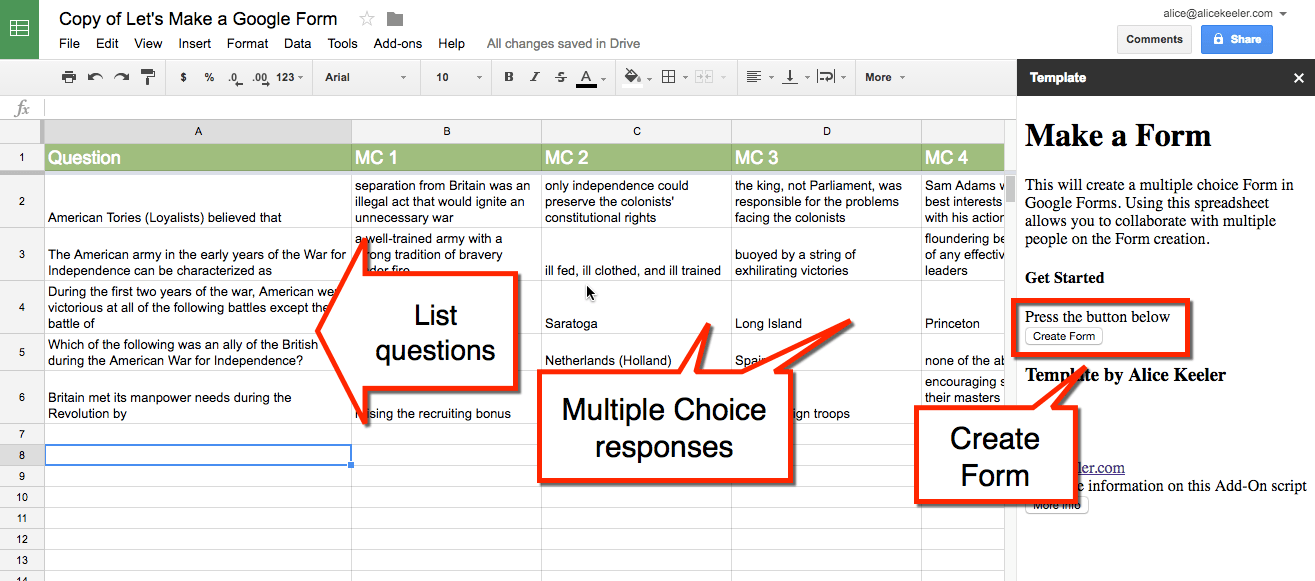
Use this spreadsheet Add-on to allow multiple people to collaboratively create multiple choice questions in a Google Sheets spreadsheet. Once the questions are designed, press a button in the sidebar to create a Google Form from the questions in the spreadsheet. Source: Together… Let’s Make a Google Form – Teacher Tech What a great add-on!…

Source: CodeCampus Academy So you’re burned out with all of the sites out there that help students learn to code, and you are feeling envious that they have options and you don’t. Well, time to turn that frown upside down with CodeCampus Academy, professional development for teachers to learn coding! The service helps you get started…

https://eduk8.me/2017/10/list-8-free-apps-try-edtech-roundup/ https://eduk8.me/2017/10/student-performance-can-be-affected-by-exposure-to-exemplary-peer-work/ https://eduk8.me/2017/10/teenagers-smartphones/
https://eduk8.me/2021/02/staff-bathroom-eduk8meme/ https://eduk8.me/2021/02/valentines-day-is-on-sunday-comic/ https://eduk8.me/2021/02/push-notifications/
Although I’ve created a couple of cheat sheets for remembering keyboard shortcuts, there are other ways to remind yourself which key does what. A lot of Google products have a key sequence that will show you the keyboard shortcuts for the current product: Product Show Keyboard Gmail* Shift – / Chromebook Control – Alt –…

A good place to start this process is to think about your school’s mission statement and vision and then think through how your makerspace can be seen as a physical representation of that strategy. Source: Worlds of Learning | Makerspace Vision Statement I used to view the whole mission/vision statement as a waste of time,…