Happy New Year!


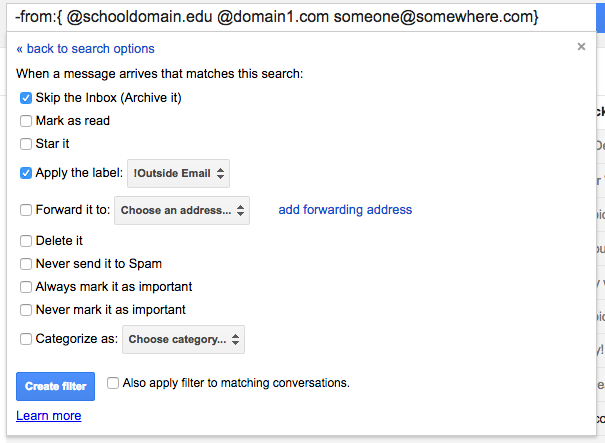
This is part 3 of 13 Gmail hacks for teachers. This is probably my favorite hack. What if I told you there was a way to only receive school email in your inbox, and all non-school email went into an Outside Email folder? And that you could do this with a 100% success rate? Well,…
https://eduk8.me/2018/03/new-kit-from-3doodler-allows-students-make-their-own-hexbug/ https://eduk8.me/2018/03/comic-sick-days-just-arent/ https://eduk8.me/2018/03/edchat-the-math-behind-why-we-forget/
I’ve tried various ways to keep a journal, and right now I use both Gmail and WordPress to journal. For today, I’m going to focus on using Gmail to journal. The workflow for using Gmail to journal is pretty simple. To add a journal entry, you will email a special address. To delete an entry,…
https://eduk8.me/2019/01/some-password-security-myths/ https://eduk8.me/2019/01/test-your-phishing-email-detection-skills-with-google/ https://eduk8.me/2019/01/comic-are-the-odds-in-my-favor/

https://eduk8.me/2018/04/check-out-webjets-for-another-way-to-share-content-online-like-padlets/ https://eduk8.me/2018/04/want-to-save-time-check-out-rss/ https://eduk8.me/2018/04/comic-test-prep-part-3/
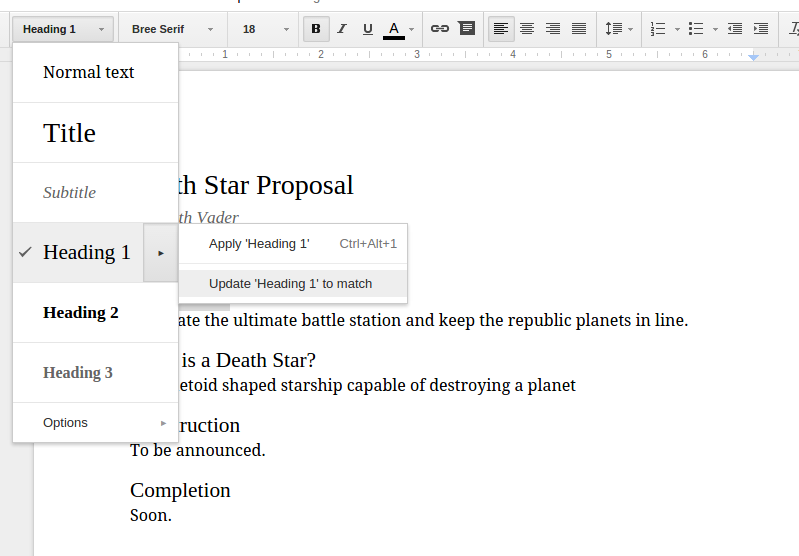
One underutilized feature of word processors is the ability to apply styles to text. I’ve mentioned styles in Google Docs before, but today I want to look into why you would use styles. In simplest terms, styles allow you to consistently format your document while also allowing you to change the look of an entire…